Shortcuts, commands, menus, file formats and vocabulary — the things you look
up rather than read.
Keyboard shortcuts
Keys
Action
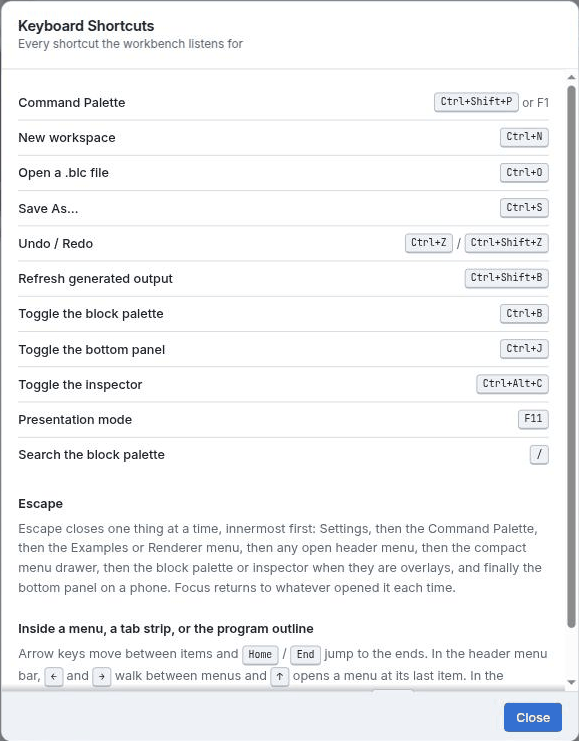
Ctrl + N
New workspace
Ctrl + O
Open a .blc file
Ctrl + S
Save workspace as…
Ctrl + Z
Undo
Ctrl + Shift + Z
Redo
Ctrl + B
Toggle the blocks sidebar
Ctrl + Alt + C
Toggle the code / Inspector panel
Ctrl + J
Toggle the bottom panel
Ctrl + Shift + B
Refresh generated output
Ctrl + Shift + P or F1
Command palette
F11
Presentation perspective
/
Focus the toolbox search field
?
Open the Keyboard Shortcuts dialog
Esc
Close the innermost thing that is open — see below
Escape closes one layer at a time
Esc works innermost-first rather than dismissing everything at once, and it returns
focus to whatever opened the layer it closed. The order is: the Settings dialog, then the
command palette, then the Examples menu, then the Renderer menu, then any other open header
menu, then the compact menu drawer, then the toolbox overlay, then the Inspector overlay, then
the bottom panel. The last three only apply at narrow widths, where those panels are overlays
rather than columns.
Inside a menu, a tab strip or the program outline, the arrow keys move between items,
Home and End jump to the ends, and ↓ on a closed menu opens it
at the first item while ↑ opens it at the last.
Fig. 1 The app carries this table itself, at ?. It is the same list as
above, so if the two ever disagree, believe the app.
Command palette
Ctrl + Shift + P. Commands are grouped by prefix; typing the prefix
filters to that group.
Prefix
Commands
File:
New Workspace · Open Workspace… · Save Workspace As…
· Recover Local Autosave · Show Menu
Edit:
Undo · Redo
Build:
Refresh Generated Output
View:
Toggle Primary Sidebar · Toggle Code and Inspector · Toggle Bottom
Panel · Show Blocks · Show Problems · Show Code · Show
Inferred Types · Show Typing Derivation · Show Outline · Show
Output
The right-click menu on an application block adds Show Type and Value,
Evaluate – Call-by-Structure and
Evaluate – Call-by-Value.
Dialogs
Dialog
Opened by
Holds
Settings
More → Settings, or Preferences: Settings
Three sections only: colour theme, perspective, and the autosave interval. The
renderer is not here — it has its own header menu.
Keyboard Shortcuts
?, More → Keyboard Shortcuts, or
Help: Keyboard Shortcuts
The shortcut list, plus prose sections on what Esc does and on arrow-key
navigation inside menus, tab strips and the outline.
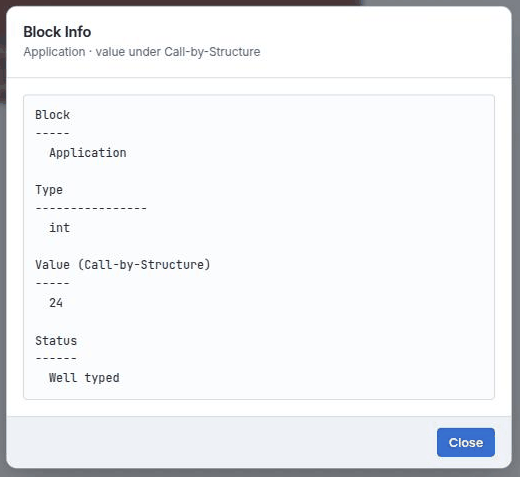
Block Info
Show Type and Value on a block's right-click menu
The selected block's type and value. The value section names the strategy that
produced it — Value (Call-by-Structure) — so the number is
never ambiguous.
About Block Lambda
More → About Block Lambda
Version and licence. This help is written against the version reported here.
Fig. 2Block Info. The value heading names its strategy —
Value (Call-by-Structure) — so a number here is never ambiguous about how it was
produced.
File formats
Format
Holds
.blc
A Block Lambda workspace. Saved and opened locally — nothing is uploaded.
Local storage
The rolling autosave backup, plus your layout, theme, renderer, autosave interval and
active tabs. Restored defensively: a malformed payload falls back to the default
layout rather than failing to start.
Lambda text
Not a file format, but the Code tab round-trips the term as text, so you can
paste a program in or copy one out.
Glossary
Term
Means
ANF
A-normal form — every intermediate result is bound to a name.
β-reduction
Applying a function by substituting the argument for the parameter.
Call-by-Structure
B-Lambda's default strategy. Strict in its argument, like Call-by-Value, but it
substitutes the structured value — the value paired with the
expression it came from — instead of the bare value. Same work, more of the
derivation left visible.
Call-by-Value
Reduce the argument to a value, then substitute. The work happens once.
CSEK machine
An abstract machine with Control, Structure, Environment and Kontinuation. The
S is the structured value, not a store — B-Lambda has no
heap.
CPS
Continuation-passing style — control flow made explicit as a passed-in
continuation.
Closure conversion
Turning a function that captures free variables into a code pointer plus an explicit
captured environment.
Kontinuation
The pending work: what the machine will do with the value it is currently computing.
Spelled with a K by convention, so the machine's initials work out.
Lockstep
The view that runs substitution, the CSEK machine and the register VM together
and checks they agree.
Normal form
A term with no reducible sub-term left. A λ is already a value, so its body is
not reduced.
Salient rule
A human-visible reduction — beta, if-true,
if-false, prim …. The unit the substitution trace
counts.
SSA
Static single assignment — each register is written exactly once, which is what
makes the φ-node projection meaningful.
Structured value
A computed value paired with the block it was computed from, written
Vp ⊗ Vv. What Call-by-Structure
substitutes, and the S in
CSEK.
Thunk
An unevaluated block plus the environment it should be evaluated in. Now used only
for letrec, whose binding is cyclic and is re-entered at each use;
ordinary arguments are evaluated strictly and bound as structured values.
Tude
B-Lambda's own Blockly renderer: Zelos connections, square corners.
Elsewhere in the workshop
MnL help — the functional language that shares
Call-by-Structure and the Lockstep view.
B-MJ help — MiniJava, where the machine gains a
store and the interesting question becomes aliasing.
Block Lambda is developed at L-Workshop. This help was
written against Block Lambda 1.2.0.